Single-User Auto Configuration Updates - Summary
The Export/Import Utility's import functionality is sometimes used in brand-new installations of IndySoft to import default configuration functionality into the system. (Single-User databases are often shipped with an entirely functioning database). Upon the first start-up of IndySoft, the import is launched. After the import is complete, the user proceeds automatically into IndySoft. This same process can be used by Single-User workstations to automatically import updated configurations from a central location - much like the automatic update process for client executable files. So, the Export/Import Utility can be used by Single-User installations to create these configuration files (export zips). These zip files are then placed in a network directory accessible to Single-User clients. Single-User clients can set up the Automatic Configuration Updates through Auto-Update Settings. If this is set up, then upon login IndySoft checks this network directory for updated configuration update files, and if found, automatically imports and updates the system.
An example of this usage: Say you have a multi-user version of IndySoft that holds your calibration data. Then you have a team of 10 mobile calibration techs with Single-User versions of IndySoft. They use the Export/Import Utility to move equipment to/from the multi-user and Single-User databases. Occasionally the 'best practice' workflow for Single-User databases is changed, and one Single-User logs into their Export/Import Utility for Single-User, exports the configuration to file, and distributes it to all the other techs through an email. This process works fine until a few techs forget to run the import or decide it isn't important, then you have varying workflows and certificates, etc. So, this process can be automated through the Single-User Auto Configuration Updates.
To create a Single-User Auto Configuration Update, select the option from the Start page in the Export/Import Utility and press 'Next.'
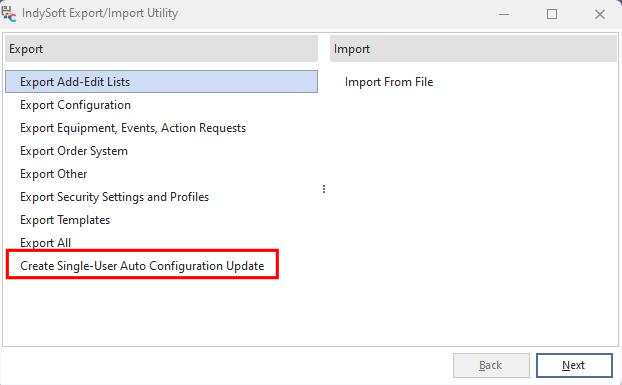
Export/Import Module - Create Single-User Auto Configuration Update |