Workflow Configuration - Status Changes
Configuration Wizard - Status Changes (Step 6 of 22)
The Status Changes tab allows for updating equipment status after an event has been completed.
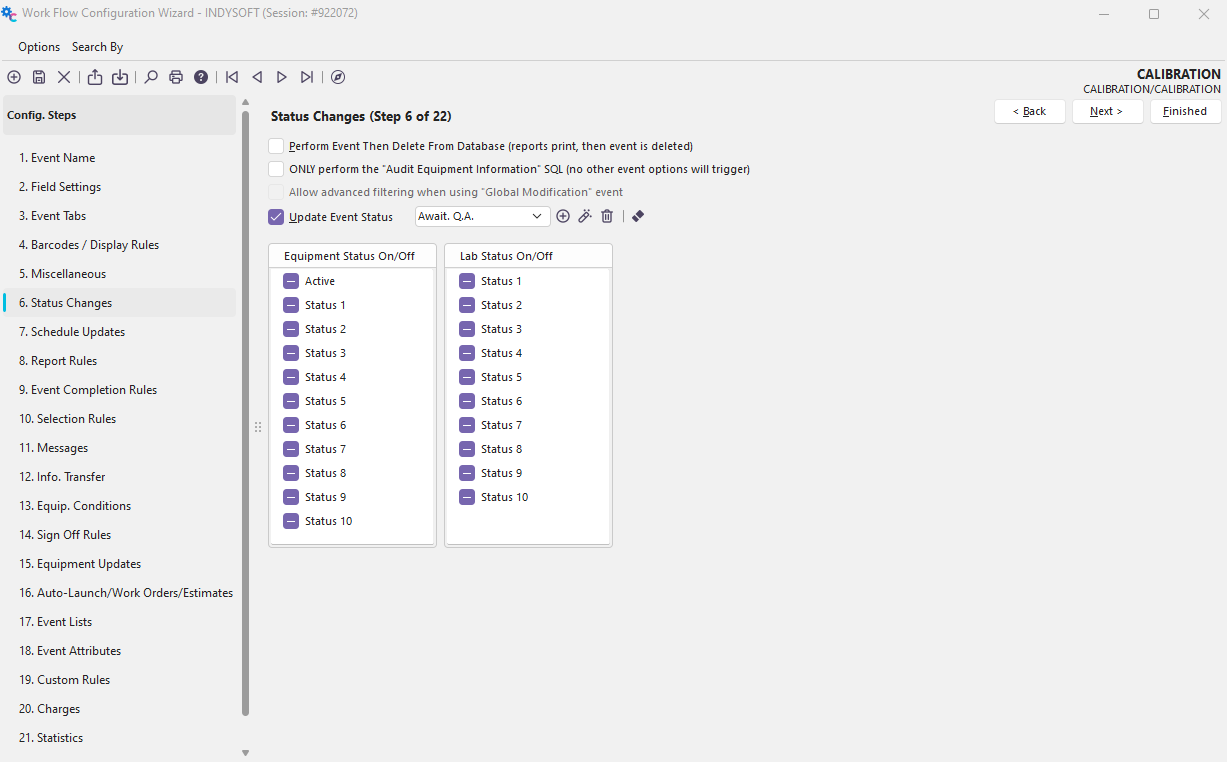
Configuration Wizard - Step 6 of 22 - Status Changes
Perform Event, Then Delete From Database
Checking this option will allow you to perform an event without storing it with a piece of equipment. This option works well for reports you want printed but not kept, such as a calibration worksheet or sticker. After the report prints, the event is deleted from the database.
ONLY perform the 'Audit Equipment Information' SQL (no other event options will trigger)
This option will only affect events with the 'Audit Equipment Information' option selected in the Event Tabs section. Selecting this box will have the effect of only updating the specified information. No other portions of the event config setup will occur (printing, selection rules, event completion rules, etc.). Checking this box will, however, significantly speed up the process of global updates.
Allow advanced filtering when using the 'Global Modification' event
Checking this option will allow you to select equipment for global updating solely through a filter-type interface. This option will remove the ability to single-select equipment to update but will be even faster than the above option (Note: for this option to be enabled, you must also turn on the above option).
Update Event Status - See Add/Edit Tracking Status
Equipment Status On/Off
Each event can turn an Equipment Status on or off after completing an event. Click on the boxes to change the status. To turn on a status, check a box. To turn off a box, make it white. To leave a status alone, leave it filled black. The following dialog is an example where Status 1 would be turned on, and Status 7 would be turned off. All other statuses would be left alone.

Lab Status On/Off
Each event can turn an Equipment Lab Tab Status on or off after completing an event. To turn on a lab tab status, check a box. To turn off a box, make it white. To leave a lab tab status alone, leave it filled black.
 |
|