Different Views / Navigation
There are six different views possible for Scheduling. If a specific date is selected in the current view, then this date will be used when selecting the appropriate date period for the new view. From any calendar item in any view, double-clicking on the scheduled item will pop up the schedule details for review. See Scheduled Event Dialog for more details.
oGrid View
oYear View
oMonth View
oWeek View
oDay(s) View
oTime Line View
Each view has a Date Navigator to the right containing one or more months (as many as can be visible). Click on a date (or multiple dates) to quickly navigate.

Or, use the  Goto Date dialog in the upper-right of Scheduler to locate a date on a particular view quickly:
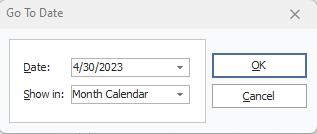
Goto Date dialog |