Workflow Configuration - Export/Import
Using the Workflow Configuration Export/Import Wizard
Workflow Configurations can easily be exported or imported from other IndySoft systems using the icons mentioned in the Workflow Configuration Overview.
 Export Event Configuration
Clicking this icon will allow you to select any of the events in the system to export to a file.
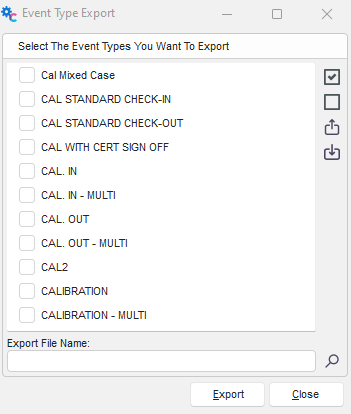
Select the Event Type(s) to export, click the folder button and designate a folder and file name to export the event. Click the Export button. A notice will pop up asking if you wish to include all event-specific security settings. Click Yes or No. You will also be asked to include all Tracking Statuses. Click Yes or No to complete the export. The files will be exported in the IndySoft Event Type (IXP).
Using the icons on the right will allow you to select or deselect all events—also the option to Export or Import an event as a Note type file.
 Import Event Configuration
This will allow you to import events from a previously exported file. Clicking this icon will open a window to search for the directory/folder where the IndySoft Export File (IXP) is located. Double-click on the .ixp file to import or single-click, then click the 'Open' button. |